


Application Development


Choosing the best app development platforms has become more important than ever as businesses race to deliver seamless digital experiences. Whether you're launching a startup, expanding an enterprise solution, or building your first mobile application, selecting the right platform can significantly impact development speed, scalability, performance, and long-term costs.
Today's app development platforms cater to a wide range of needs. Some focus on cross-platform development, allowing developers to build Android and iOS apps from a single codebase, while others specialize in native development, low-code workflows, or enterprise application development. With so many options available, it can be difficult to know which one best fits your project.
In this guide, we've compared the 10 best app development platforms in 2026, highlighting their key features, strengths, limitations, pricing models, and ideal use cases. Whether you're an experienced developer or a business owner exploring the best platform to create an app, this comparison will help you make an informed decision.
An app development platform is a software environment that provides the tools, frameworks, and services needed to design, build, test, deploy, and maintain mobile or web applications. Depending on the platform, developers can write code from scratch, use visual drag-and-drop builders, or combine both approaches to accelerate development.
Modern mobile app development platforms generally fall into four categories:
Beyond coding tools, many platforms include features such as cloud hosting, backend services, API integrations, authentication, analytics, and automated deployment. These capabilities simplify the development process and help teams bring products to market faster.
The right platform ultimately depends on your project goals, technical expertise, budget, performance requirements, and future scalability.
Not every app development platform is built for the same purpose.
Some excel at creating high-performance native apps, while others help businesses launch applications quickly with low-code or no-code tools.
To ensure this list is practical and unbiased, Our team evaluated each platform based on hands-on development experience, official documentation, community adoption, scalability, integration capabilities, and suitability for different business needs in 2026.
A great platform should simplify the development process without limiting flexibility. We considered how easy it is to get started, the quality of documentation, learning curve, and the availability of visual development tools or reusable components.
Many businesses need applications that work seamlessly on both Android and iOS. We assessed each platform's ability to support cross-platform app development while maintaining performance and a consistent user experience.
As applications grow, they need to handle more users, features, and data. We prioritized platforms that produce reliable, scalable applications capable of supporting long-term business growth.
Modern app development software should include more than just coding tools. We looked at built-in features such as cloud services, backend support, API integrations, authentication, databases, analytics, and deployment options that help streamline development.
An active developer community makes it easier to solve problems and stay up to date with best practices. Platforms with extensive documentation, third-party libraries, tutorials, and strong community support scored higher in our evaluation.
Cost is an important consideration for startups, growing businesses, and enterprises alike. We compared free plans, licensing models, enterprise offerings, and the overall value each platform provides relative to its capabilities.

Flutter continues to rank among the best app development platforms thanks to its ability to build beautiful, high-performance applications for Android, iOS, web, desktop, and embedded devices from a single codebase. Developed by Google, it has become a leading choice for businesses seeking efficient cross-platform app development without sacrificing performance.
Unlike many frameworks, Flutter renders its own UI using the Skia graphics engine, allowing developers to create smooth animations and highly customized interfaces that look consistent across platforms.
Key Features
Pros
Cons
Best For: Startups, businesses, and developers building high-quality cross-platform mobile applications.
React Native remains one of the most popular mobile app development platforms for building Android and iOS applications using JavaScript and React. Backed by Meta, it enables developers to share much of their code across platforms while still accessing native device features.
Its mature ecosystem, extensive third-party libraries, and widespread adoption make it a reliable choice for teams that already have web development experience with React.
Key Features
Pros
Cons
Best For: Businesses and development teams looking for a balance between speed, flexibility, and cross-platform compatibility.
FlutterFlow has become one of the leading low-code development platforms for creating mobile applications visually while generating clean Flutter code. It enables developers, startups, and product teams to design interfaces using a drag-and-drop editor and export production-ready code for further customization.
Because it's built on Flutter, applications created with FlutterFlow can achieve native-like performance while significantly reducing development time.
Key Features
Pros
Cons
Best For: Startups, entrepreneurs, designers, and businesses that want to validate ideas quickly using a low-code development platform.
Bubble is widely recognized as one of the best no-code app builders for creating fully functional web applications without writing code. Its visual editor allows users to build workflows, databases, user authentication, and integrations through an intuitive interface.
Although Bubble primarily focuses on web applications, it remains an excellent option for businesses launching SaaS products, internal tools, marketplaces, and customer portals before investing in native mobile apps.
Key Features
Pros
Cons
Best For: Entrepreneurs, startups, and non-technical founders looking for a powerful no code app builder.
Android Studio is Google's official IDE for Android app development and remains the preferred choice for developers building native Android applications. It offers advanced development tools, intelligent code editing, debugging features, and seamless integration with the Android SDK.
For businesses targeting Android users exclusively or requiring deep integration with Android hardware and APIs, Android Studio provides maximum flexibility and performance.
Key Features
Pros
Cons
Best For: Developers building feature-rich native Android applications.
Xcode is Apple's official integrated development environment for iOS app development, macOS, watchOS, and tvOS applications. It provides everything developers need to build, test, and publish apps across Apple's ecosystem.
With support for Swift and Objective-C, Xcode enables developers to create highly optimized applications that fully leverage Apple's hardware and software capabilities.
Key Features
Pros
Cons
Best For: Businesses and developers creating premium native iPhone, iPad, Apple Watch, and Mac applications.
Microsoft Power Apps is a leading enterprise application development platform that enables organizations to build business applications with minimal coding. As part of the Microsoft Power Platform, it integrates seamlessly with Microsoft 365, Dynamics 365, Azure, and hundreds of third-party services.
Its low-code approach allows organizations to automate workflows, digitize manual processes, and create internal business applications much faster than traditional development methods.
Key Features
Pros
Cons
Best For: Enterprises building secure internal applications and workflow automation solutions.
OutSystems is a powerful application development platform designed for organizations that need to build enterprise-grade applications quickly without compromising scalability or security. Its AI-assisted low-code environment helps development teams create, deploy, and manage complex applications while reducing development time.
The platform supports web, mobile, and cloud applications, making it a strong choice for digital transformation initiatives and large-scale enterprise projects.
Key Features
Pros
Cons
Best For: Large organizations and enterprises building mission-critical applications that require scalability, security, and long-term support.
Mendix is another leading enterprise app development platform that enables businesses to build applications faster through a collaborative low-code environment. It combines visual development with traditional coding, making it suitable for both business users and professional developers.
Its cloud-native architecture and AI-assisted development tools help organizations modernize legacy systems and accelerate digital transformation.
Key Features
Pros
Cons
Best For: Enterprises looking to build scalable business applications while improving collaboration between technical and non-technical teams.
Firebase is Google's comprehensive backend platform that complements many of today's mobile app development platforms. While it isn't a traditional app builder, it provides the infrastructure developers need to build, launch, and scale applications more efficiently.
Firebase offers real-time databases, authentication, cloud storage, hosting, analytics, push notifications, and AI-powered services, making it an essential tool for modern mobile app development.
Key Features
Pros
Cons
Best For: Developers building scalable Android, iOS, and web applications that require reliable backend services.
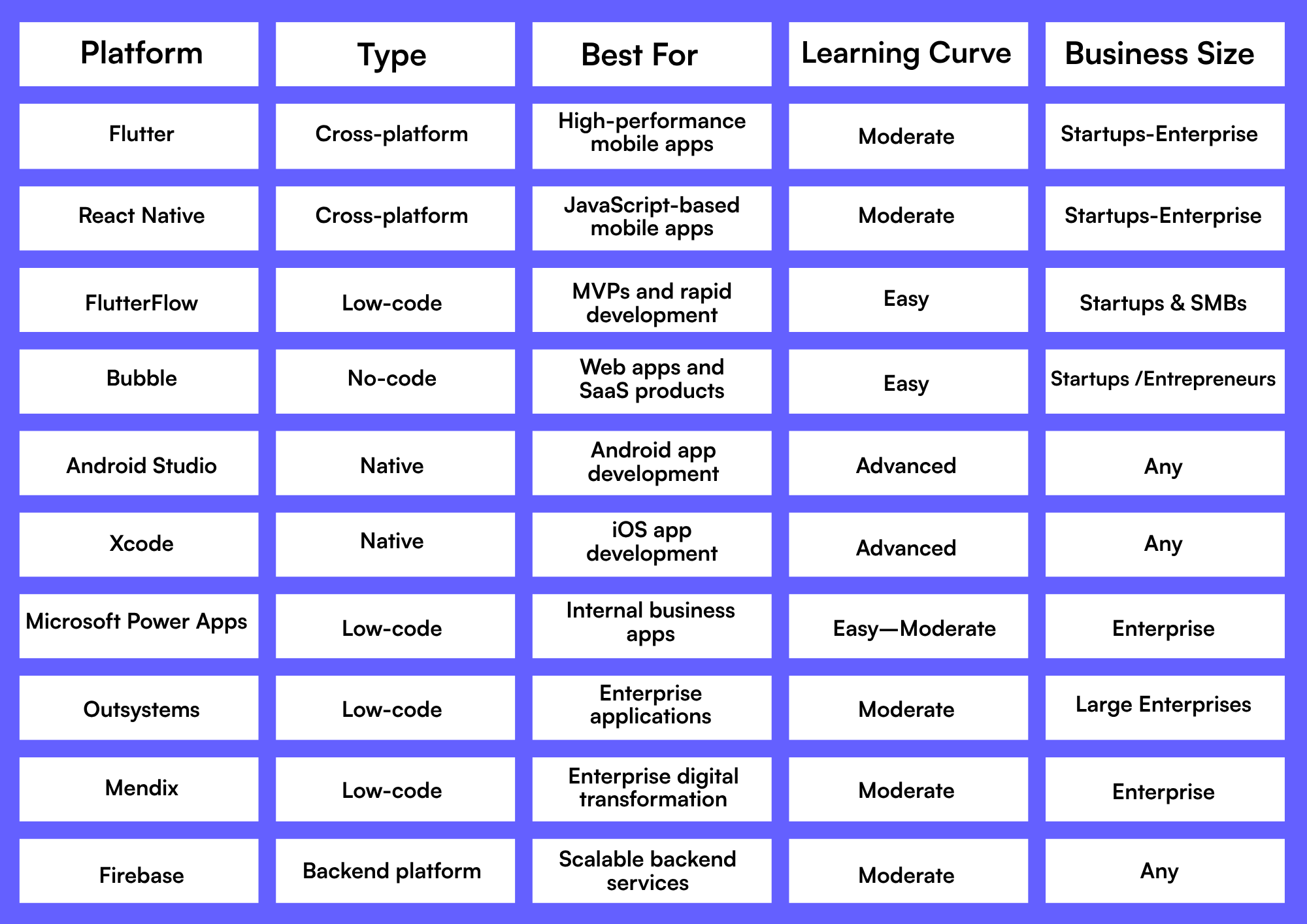
The best app development platform depends on your business goals, budget, technical expertise, and the type of application you plan to build.
While app builders and low-code platforms are excellent for many projects, they aren't always the right solution. Businesses with unique workflows, advanced integrations, strict security requirements, or long-term scalability goals often benefit more from custom mobile app development.
A custom-built application gives you complete control over features, performance, user experience, integrations, and future expansion. It's also the better option when your app plays a central role in your business operations or customer experience.
If your project requires advanced functionality, seamless third-party integrations, or a tailored UI/UX, partnering with an experienced development team can deliver greater flexibility and long-term value than relying solely on pre-built platforms.
The best app development platform depends on your project. Flutter and React Native are ideal for cross-platform apps, while Bubble and FlutterFlow are great for low-code and no-code development.
If you're new to app development, FlutterFlow, Bubble, and Microsoft Power Apps are among the easiest app builders to learn because they require little or no coding.
Low-code development allows some coding for customization, while no-code app builders rely entirely on visual tools, making them suitable for non-developers.
Flutter and React Native are the best platforms for building mobile apps because they let you develop Android and iOS apps from a single codebase.
Firebase isn't a complete app development platform. Instead, it provides backend services such as authentication, databases, cloud storage, and analytics for mobile applications.
Choose custom mobile app development when your project requires unique features, advanced integrations, high security, or long-term scalability beyond what standard app development tools can offer.
Choosing among the best app development platforms in 2026 comes down to your business goals, technical requirements, and available resources. Whether you need the flexibility of Flutter, the familiarity of React Native, the speed of FlutterFlow, or the simplicity of Bubble, each platform offers unique advantages for different types of projects.
For startups and small businesses, low-code and cross-platform solutions can accelerate development and reduce costs. Larger organizations, on the other hand, may benefit from enterprise platforms like OutSystems or Mendix for complex business applications. Pairing these platforms with backend services like Firebase can also enhance scalability and performance.
However, if your application requires advanced functionality, seamless integrations, or a tailored user experience, custom mobile app development remains the most flexible and future-ready approach. At Apperr, we help startups, growing businesses, and enterprises design, build, and scale custom mobile applications tailored to their unique goals. Whether you're validating an MVP or developing a feature-rich enterprise solution, our team can help you choose the right technologies and deliver a secure, scalable product built for long-term success.
%201.png)


